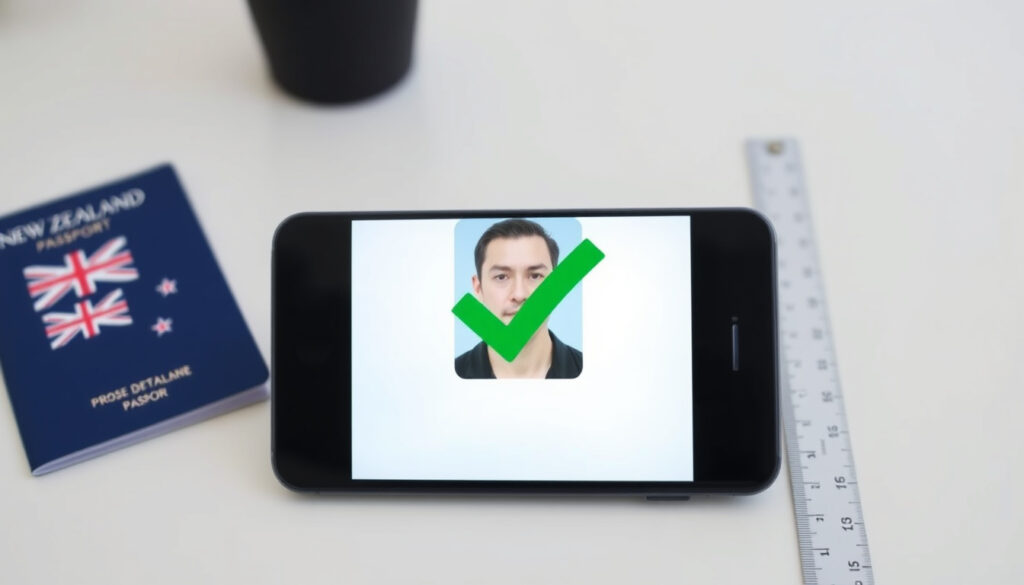
Passport Photo Checker NZ: Free Online Tool & Requirements
A passport photo needs to pass a surprising number of technical checks, but New Zealand Passports provides a free online Photo Checker to validate yours before you submit. This guide explains how it works, what it checks, and how to fix a photo that fails.
Official tool URL: onlinephotochecker.passports.govt.nz ·
Required photo size: 35mm × 45mm ·
Photo age limit: Less than 6 months ·
Cost: Free ·
File format: JPEG or JPG (250KB–5MB)
Quick snapshot
- The official tool is free and requires no login NZ Passports (Photo Checker T&C)
- Photo dimensions must be 35mm × 45mm NZ Passports PAS310
- Photo must be less than 6 months old NZ Passports (Photo page)
- Whether the checker will reject photos with slight shadows NZ Passports guidance
- Future updates to file size or resolution limits (NZ Passports guidance)
- Whether the checker detects digital alterations NZ Passports (Photo page)
- Whether the acceptance criteria match the final application review exactly NZ Passports (Photo Checker T&C)
- Photo must be retaken every 6 months Immigration NZ
- Passport validity: 10 years (adults), 5 years (children) NZ Passports
- If photo passes: start your application Photo Checker tool
- If photo fails: retake using the checker’s feedback NZ Passports T&C
- Use Identity Check for verification DIA Identity Check
Six official specifications, one baseline: your photo must match the passport form’s blueprint exactly.
| Specification | Requirement |
|---|---|
| Official Tool URL | onlinephotochecker.passports.govt.nz |
| Photo Width | 35mm NZ Passports PAS310 |
| Photo Height | 45mm NZ Passports PAS310 |
| Photo Age Limit | Less than 6 months NZ Passports |
| Cost | Free |
| File Format | JPEG or JPG NZ Passports |
How to check if a photo is ok for a passport?
The official New Zealand Passports Photo Checker is a pre-validation tool hosted directly by the passport office. It runs the same technical checks that an application processor would run, but without requiring you to start a formal application or log into a system NZ Passports (Photo Checker T&C).
The checker acts as a pass/fail gate, not a guarantee. Passing the digital check confirms technical eligibility; the final decision rests with a passports officer who reviews the physical application.
What the checker actually checks
- Dimensions and aspect ratio: The photo must have a 3:4 aspect ratio, matching the 35 mm x 45 mm print size required by the PAS310 form NZ Passports PAS310.
- File type and size: Only JPEG or JPG files are accepted, and they must be between 250 KB and 5 MB NZ Passports (Photo page).
- Pixel resolution: The image must be 900–4500 pixels wide and 1200–6000 pixels high NZ Passports (Photo page).
- Background and lighting: The background must be plain white or light gray, with high contrast against the face. No shadows, objects behind the head, or visible background details are allowed NZ Passports (Photo page).
- Composition and expression: The face must be fully visible, not tilted or turned. Hair must be away from the eyes. The expression must be neutral with eyes open and mouth closed NZ Passports (Photo page).
Common reasons for rejection
- Shadows on the face or background — even soft lighting gradients can cause a fail NZ Passports (Photo page).
- Head too large or too small — the head (including hair) must be centred and occupy up to 80% of the photo NZ Passports PAS310.
- File too large or wrong format — files over 5 MB or images saved as PNG get rejected instantly NZ Passports (Photo page).
- Photo is too old — the checker validates that the image file’s metadata or upload date is within 6 months Immigration NZ (photo rules).
The pattern: the tool is strict on technical rules but silent on subjective aesthetics. A boring, rule-following photo is the safest bet.
Can I look up my passport photo online?
No. The Photo Checker is a transient pre-validation tool — it processes an uploaded image, gives a pass/fail verdict, and stores nothing. It is not a photo gallery or retrieval service NZ Passports (Photo Checker T&C).
Where the photo is stored after you submit your application
Once you formally submit a passport application, the photo is stored securely in the New Zealand Passports database alongside your biometric and personal data Govt.nz (Passports overview).
How to retrieve your passport photo from NZ Passports
You cannot independently retrieve a copy. If you need a duplicate of your submitted photo, you must request it through the official channels or submit a new one. The checker exists solely to prevent errors before they reach the application queue NZ Passports (Photo Checker T&C).
The catch: the checker is a one-way tool. It validates and forgets — you cannot retrieve your photo from it.
How can I verify my passport in New Zealand?
For applicants and third parties, the Department of Internal Affairs (DIA) runs the Identity Check service. It uses your passport photo as the anchor for digital identity verification DIA (Identity Check service).
Using the Identity Check service
The Identity Check service uses facial recognition technology to match a live image or a newly uploaded photo against existing passport and citizenship records. It is available to individuals and authorised organisations for real-time identity verification DIA (Identity Check service).
Verifying passport details for third parties
Employers, government agencies, and other authorised entities can use the same service to verify a person’s identity — provided the individual has given explicit consent DIA (Identity Check service).
Why this matters: the same photo you check with the online tool becomes the baseline for your digital identity verification requests.
Can I check my passport’s validity online?
Yes, but through a different portal. Passport validity is managed via the New Zealand Passports application portal or through a RealMe-logged session, not through the Photo Checker NZ Passports (Adult passports).
Checking your passport expiry date online
Log into the New Zealand Passports portal. Your current passport status — including the expiry date and any active renewal requests — is displayed on your account dashboard NZ Passports (Adult passports).
Passport validity requirements for international travel
Many countries enforce a six-month validity rule: your passport must have at least six months remaining beyond your departure date to enter. Checking your expiry date is a separate step from checking your photo, but both are prerequisites for a smooth application Wikipedia (Passport photo rules).
The implication: knowing your validity is a separate process from checking your photo, but both are prerequisites for a smooth application.
How can I verify someone’s passport details?
Only authorised parties can verify another person’s passport details without their direct involvement. The system is built around consent and controlled access DIA (Identity Check service).
Authorized verification services
Government departments and accredited employers can access the Identity Check service to confirm passport authenticity and validity. The service provides a secure, real-time match against the official passport database DIA (Identity Check service).
Limitations for individuals
An individual cannot look up someone else’s passport information without authorisation. Third-party verification always requires explicit consent and a recognised legal or commercial purpose DIA (Identity Check service).
The pattern: New Zealand’s identity system is designed around consent and controlled access — the passport checker itself is strictly a personal pre-validation tool.
Ten parameters, one pattern: the photo must be technically boring — no edits, no shadows, no filters.
| Parameter | Requirement (from official sources) |
|---|---|
| Dimensions | 35mm × 45mm NZ Passports PAS310 |
| Aspect ratio | 3:4 NZ Passports (Photo page) |
| File type | JPEG or JPG NZ Passports (Photo page) |
| File size | 250 KB – 5 MB NZ Passports (Photo page) |
| Pixel width | 900 – 4500 NZ Passports (Photo page) |
| Pixel height | 1200 – 6000 NZ Passports (Photo page) |
| Photo age | Less than 6 months NZ Passports (Photo page) |
| Background | Plain white or light gray, no shadows NZ Passports (Photo page) |
| Expression | Neutral, eyes open, mouth closed NZ Passports (Photo page) |
| Head size | Centred, up to 80% of frame NZ Passports PAS310 |
The trade-off: wider pixel ranges give more flexibility for smartphone photos, but the head-size and background rules remain the strictest barriers for most applicants.
Using the official Photo Checker: step by step
Running the checker before you submit your application removes the most common cause of processing delays. It takes less than two minutes.
- Go to the checker. Visit onlinephotochecker.passports.govt.nz. No login is needed and the tool is completely free NZ Passports (T&C).
- Upload your photo. Click the upload button and select a JPEG or JPG file that is between 250 KB and 5 MB NZ Passports (Photo page).
- Wait for the result. The tool processes the image in a few seconds and displays a clear pass or fail message.
- If it passes: Download or save the confirmation. You can now use this photo in your passport application.
- If it fails: Read the specific reason shown — it will tell you whether the problem is the file type, the dimensions, the background, or the age of the photo NZ Passports (T&C).
The payoff: a passed check removes the most common cause of passport processing delays. It is a five-minute investment that can save weeks of waiting for a follow-up letter.
Key insights: confirmed vs unclear
Confirmed facts
- The official NZ passport photo checker is free and does not require login NZ Passports (T&C)
- Passport photo dimensions are 35mm x 45mm NZ Passports PAS310
- Photos must be less than 6 months old NZ Passports (Photo page)
- Background must be white or light gray NZ Passports (Photo page)
- File format must be JPEG or JPG, max 5MB NZ Passports (Photo page)
What’s unclear
- Whether the photo checker will reject photos with slight shadows NZ Passports guidance
- Future updates to photo requirements
- How precisely the tool evaluates head tilt in borderline cases
- Whether the checker detects digital alterations NZ Passports (Photo page)
- Whether the acceptance criteria match the final application review exactly NZ Passports (Photo Checker T&C)
The catch: the official requirements are clear on dimensions, format, and age, but the checker’s tolerance for shadows and head tilt remains unspecified.
Official guidance and expert perspectives
“Use the online photo checker to make sure your photo meets the technical requirements before you start your application.” — New Zealand Passports (official Photo Checker guidance)
“Your photo must be less than 6 months old and clearly identify you.” — Immigration New Zealand (visa and NZeTA photo guidance)
“Professional photo takers can use the online photo checker to verify a photo before providing it to a customer in electronic format.” — New Zealand Passports (Photo Checker terms)
What this means: the photo checker is endorsed by multiple government agencies as a pre-validation tool.
Summary
For anyone applying for a New Zealand passport, the path is clear: pre-check your photo with the free official tool. If it passes technical inspection, you have removed the most common cause of delay. If it fails, the rejection message tells you exactly what to fix — adjust the lighting, retake the photo, or choose a different file size. For the NZ applicant, the choice is simple: use the Photo Checker before you mail your form, or risk a waiting period you could have avoided.
govt.nz, passports.govt.nz, passports.govt.nz, passports.govt.nz, passports.govt.nz, passports.govt.nz, immigration.govt.nz, immigration.govt.nz, immigration.govt.nz
Frequently asked questions
What happens if my photo fails the checker?
The tool displays the specific reason for failure — typically a file-size issue, a shadow detected on the background, or a head-size problem. You can adjust your photo and re-upload it as many times as needed NZ Passports (T&C).
Can I use the same photo for a visa application?
Immigration New Zealand accepts the same passport-style photo for most visa and NZeTA applications, provided it meets their specific upload requirements — which are very similar to the passport rules Immigration NZ (visa photo page).
Do I need a login to use the photo checker?
No. The online Photo Checker is open to anyone and does not require a RealMe login or any other authentication. It is designed to be used before you start your application NZ Passports (T&C).
How long does the photo check take?
The tool processes the image in seconds. From upload to pass/fail result, the entire check usually completes in under ten seconds NZ Passports (Photo Checker tool).
Can I take a passport photo on my phone?
Yes, but the photo must follow the same rules: plain background, no shadows, neutral expression. The official iPhone guide published by New Zealand Passports shows exactly how to frame the shot using a smartphone NZ Passports (iPhone guide).
Is there a mobile app for the NZ passport photo checker?
There is no dedicated mobile app for the Photo Checker. The tool is accessed through a mobile browser at onlinephotochecker.passports.govt.nz and works well on phone screens.
More related posts
 Self-Propelled Lawn Mower: Meaning, Pros, Cons, and Best Picks
 Turners Cars Christchurch Used Cars: Buying Guide
 White and Wong’s Queenstown: Dress Code, Menu & Local Tips
 What Time Is It in Vietnam? Time Zone & Travel Tips
 Putaruru Blue Spring Reviews: Walk Length, Swim Ban & More
 How Old Is the Sun? Age, Composition, and Future of Our Star
 Shoyu Ramen Near Me: Dublin Guide & Health Tips
 90 Mile Beach Tides: Times, Swell Forecasts & Safety Tips
